
AAF Audio Extractor
A downloadable tool for Windows
WHAT'S NEW IN v1.8
==================
CROSSFADE SUPPORT
-----------------
The extractor now handles crossfades (overlapping clips) correctly.
When two clips overlap on the timeline, their audio is mixed additively
with sample-level clamping, producing smooth transitions without clicks
or digital distortion.
Technical details:
- Additive PCM mixing with per-sample clamping (16/24/32-bit)
- Fast byte copy for non-overlapping regions (performance optimized)
- Chunk scanning to identify overlap boundaries efficiently
- Works for both mono and stereo consolidated tracks
GAIN AUTOMATION
---------------
Audio gain/volume data embedded in AAF metadata is now read and applied:
- Constant gain: Fixed volume level applied uniformly to a clip
(e.g., -6dB reduction)
- Varying gain (automation): Time-varying volume envelopes with
keyframe interpolation, applied per-sample across the clip
- Supports AAF ConstantValue, VaryingValue, and Rational parameters
The extraction log shows when gain is detected and applied:
"Gain detected: N constant, M automated"
"Gain applied to N clip(s)"
FADE SUPPORT
------------
Linear fade-in and fade-out transitions from the AAF timeline are now
detected and applied:
- Fade-in: Ramps audio from silence to full volume
- Fade-out: Ramps audio from full volume to silence
- Detects transitions adjacent to clips in the AAF sequence
- Works for both simple fades (from/to silence) and crossfades
(between clips)
SMART TRACK GROUPING
--------------------
Tracks are now automatically classified based on their names and
source file keywords:
- Voice: tracks containing "voice", "dialog", "narr", "vo", or
named "Audio 1"
- Music: tracks containing "music" or unclassified tracks
- SFX: tracks containing "sfx" or "sound effect"
Each group is exported as a separate file:
filename_voice.wav
filename_music.wav
filename_sfx.wav
L/R channel pairs (e.g., "Audio 2_L" / "Audio 2_R") are
automatically combined into stereo output.
IMPROVED OFFSET WORKAROUND
---------------------------
The experimental workaround for broken AAF exports (where all clips
have start=0) has been improved:
- Now uses the actual timeline edit rate instead of a hardcoded value
- Validates that sufficient audio data is embedded before applying
sequential offset corrections
- Skips correction when embedded audio is too short, preventing
incorrect offset assignments
DESCRIPTION
-----------
Tool for extracting audio from AAF (Advanced Authoring Format) files
exported from video editors such as Premiere Pro, DaVinci Resolve, etc.
Automatically extracts:
- Voice track (mono)
- Combined stereo music
REQUIREMENTS
----------
- Windows 10 or higher
- No Python installation or additional dependencies required
HOW TO USE
---------
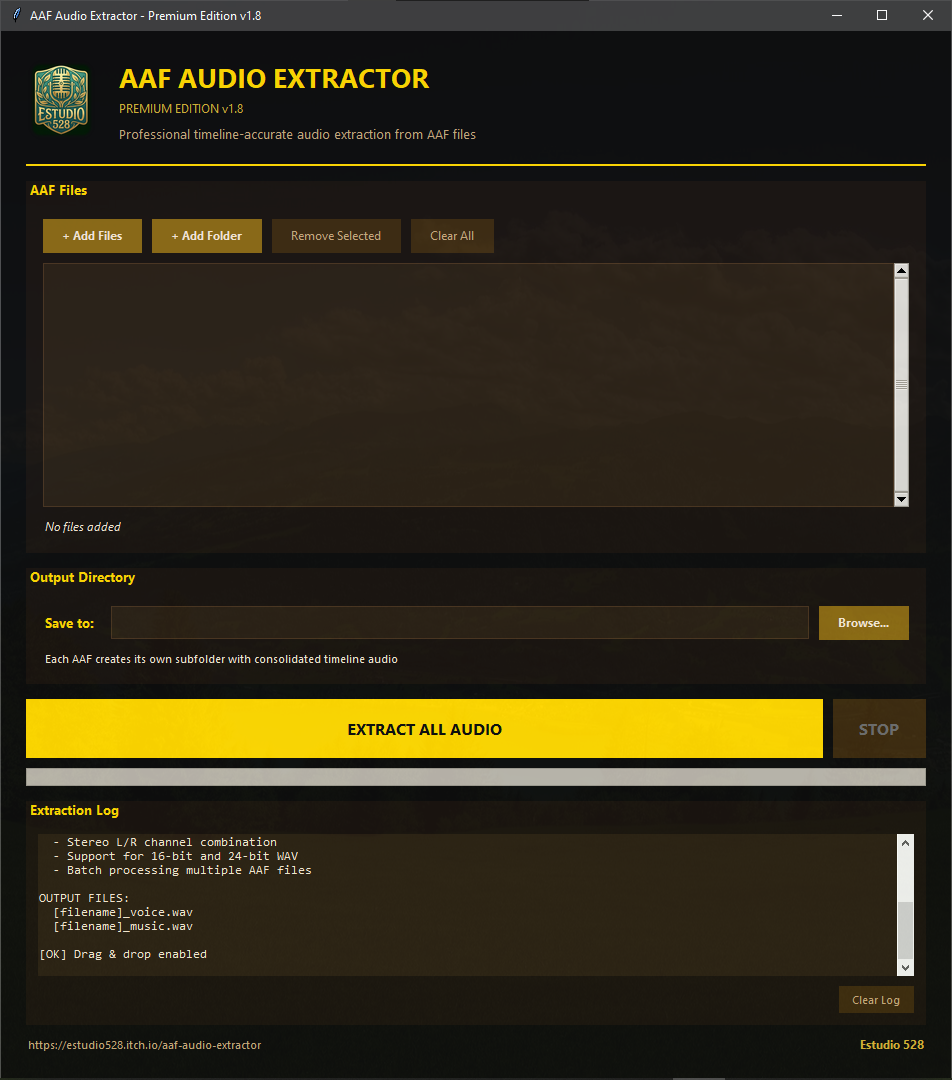
1. Run AAF_Audio_Extractor.exe
2. Click ‘Add Files’ or ‘Add Folder’ to add AAF files or drag and frop AAF files to the GUI.
3. Select output directory with ‘Browse...’
4. Click ‘Extract All Audio Files’
5. Extracted files will be saved in organised subfolders
SUPPORTED FORMATS
-------------------
- Input: .aaf files
- Output: .wav files (16-bit or 24-bit, depending on the original)
OUTPUT STRUCTURE
--------------------
For each AAF file, a folder is created:
[filename]_extracted/
IMPORTANT NOTES
-----------------
- Fades and automation are NOT applied to the extracted audio
- To export with fades applied, use the export function
of your editor to render the tracks with the automations applied (Premiere Pro, DaVinci, etc.)
- If the AAF file shows warnings about ‘FAT sector count’,
this is normal and safe - the audio will be extracted correctly
SUPPORT
-------
Developed by David García Sánchez
Thanks for supporting this tool's development!
Purchase
In order to download this tool you must purchase it at or above the minimum price of 9.99€ EUR. You will get access to the following files:
Download demo
Development log
- AAF Audio Batch Extractor updated to version v1.6!48 days ago
- AAF Audio Batch Extractor updated to 1.5! Extract audio tracks from AAF Files56 days ago
- AAF Audio Batch Extractor updated to v1.2.1 - Extract Voice & Music from AAF Fil...57 days ago
- AAF Audio Batch Extractor v1.0.0 Released! 🎧🔊 Extract Voice & Music from A...60 days ago
Leave a comment
Log in with itch.io to leave a comment.